


How do you choose between GEGI industrial cameras, HDMI industrial cameras and VGA industrial camera
In visual inspection solutions, these three types of camera represent entirely different paths for the images. The key to selecting the right model lies not in the specifications, but in whether the images are ultimately intended to be ‘processed’ by an algorithm or ‘viewed’ by the human eye.

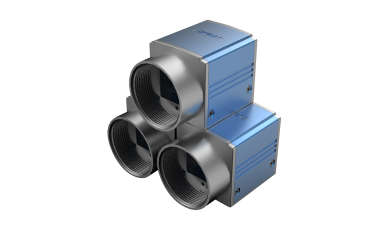
Definition of GEGI Industrial Cameras

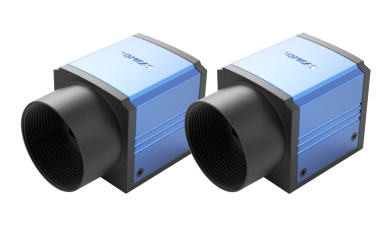
This refers to GigE Vision industrial cameras, which output raw digital image data packets via a standard Ethernet port. They must be connected to a computer or embedded platform and rely on a software development kit to reconstruct the images. A single Ethernet cable enables stable transmission over distances of up to 100 metres, and supports Power over Ethernet (PoE) and synchronised networking of multiple cameras. These cameras do not display images directly; they merely serve as a data source for algorithms.
Definition of HDMI Industrial Cameras

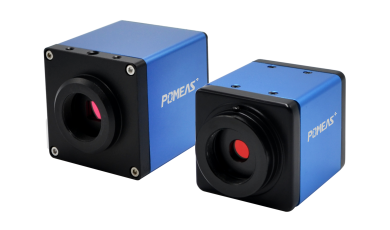
This is a plug-and-display camera in which all image encoding is carried out internally; simply connect it directly to a monitor via an HDMI cable to view the live feed. No drivers or host computer are required; the image appears as soon as power is supplied. Most models also support mouse control, saving images to a USB stick and the overlay of measurement lines. Essentially, it provides the human eye with an independent electronic monitoring window.
Definition of VGA Industrial Camera

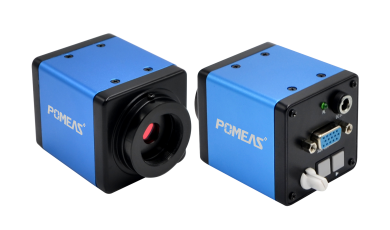
It outputs an analogue VGA video signal, which can directly drive a large number of older VGA monitors. The resolution is typically standard definition; whilst analogue signals are susceptible to interference, this solution is inexpensive to deploy and is primarily used to ensure compatibility with older display devices.
How are Industrial Cameras selected for visual inspection solutions?

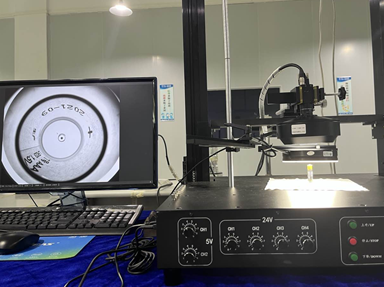
Everything is determined by the ‘flow of information’.
If the solution is to perform algorithmic assessments such as automatic dimensional measurement, defect detection and barcode-based positioning, the images must be fed into a computer for analysis; in this case, a GEGI industrial camera is the only viable option. Images of workpieces on the production line are transmitted via a Gigabit Ethernet connection to an industrial PC; after the software has completed edge detection and tolerance assessment, it outputs an OK/NG signal to control the sorting process. Such applications place extremely high demands on data integrity and programmability; Gigabit Ethernet cameras integrate seamlessly into the coding environment and, with the aid of switches, can be conveniently configured into networked inspection systems with multiple stations and viewing angles. In this context, it is irrelevant whether the camera can be connected directly to a monitor, as the true ‘inspector’ is the algorithm.
If the solution merely involves creating a visual inspection or manual comparison stage for the human eye—such as manual re-inspection of appearance, monitoring of welding alignment, or localised magnification on an assembly line—an HDMI industrial camera is the most direct and efficient choice. A single camera paired with a monitor constitutes a complete monitoring station, requiring no computer whatsoever. Operators can view smooth, low-latency images in real time and adjust exposure, freeze frames, and take comparison shots using a mouse, with zero deployment barriers.
VGA industrial cameras, on the other hand, are used almost exclusively for retrofitting older systems. When existing equipment is fitted with displays that only accept VGA signals, and the cost of a complete replacement is too high, they can be used to replace old analogue cameras, enabling a seamless upgrade. In some industrial environments with strong electromagnetic interference, analogue VGA links can actually operate more reliably due to their isolation properties; in such cases, choosing them is a practical solution.
Furthermore, transmission distance influences the choice of camera: GEGI cameras can be extended over several kilometres via fibre optics, making them suitable for centralised monitoring; HDMI and VGA cameras, however, are limited by cable length and can only be deployed within a radius of approximately ten metres around the control console.
Product recommendation
TECHNICAL SOLUTION
MORE+You may also be interested in the following information
FREE CONSULTING SERVICE
Let’s help you to find the right solution for your project!
 ASK POMEAS
  PRICE INQUIRY
  REQUEST DEMO/TEST
  FREE TRIAL UNIT
  ACCURATE SELECTION
- APPICATION CASE
- RESOURCE CENTER
- DOWNLOAD CENTER
SOLUTIONS SUPPORT
- ZOOM LENS SELECTION TOOL
- TELECENTRIC LENS SELECTION TOOL
- FA LENS SELECTION TOOL
- ZOOM RATIO TABLE
- CERTIFIED MODEL
SELECTION TOOL
- WHY POMEAS
- FAQ
- PRIVACY POLICY
- TERMS OF USE
- DELIVERY & RETURN POLICY
CUSTOMER CARE
 ADDRESS
Add.:No.68, Yongwei Road, Baizhoubian, Dongcheng District, Dongguan, China,523000
CONTACT
 Tel:+ 86-0769-2266 0867
 Fax:+ 86-0769-2266 0867
 E-mail:marketing@pomeas.com

Wechat QR code

Software Copyright :2021SR0176001 抄袭必究, 技术支持:誉新源科技